
Brutal Dev's Guide to Klapping Boet Fighter
October 12. 2019 0 Comments
Many okes like myself find Boet Figther incredibly difficult (as it was intended). So flippin tough, that okes have been klapping the game for several hours and only getting to the third bladdy level! This grinding stops being fun after a while and I don't have a lot of time to drib millions of dooses in the face over and over for hours just to check some kiff videos clips and have a laugh, so I needed to find a way to win...
Don't get me wrong, I really enjoy playing this game, but I enjoy moering okes more without getting moered back. This game is very entertaining and very much worth the money for the solid work the developers put into it and there crazy fast turnaround with bug fixes and features. Hard Eddy isn't the hardest charna in town if he keeps getting bliksemmed so easily, I wanted a Harder Eddy, the Hardest Eddy of them all, Invincible Eddy!
This is cheating, but nothing that the likes of GameGenie never did for us in the 80's, so if you don't like it then get outta here before you get offended.
Looking For Save Games
A quick file/folder search for "Boet Fighter" and I discovered the save game file in your user's \AppData\LocalLow\Califourways\Boet Fighter directory. Simply opening up in Notepad reveals that it's just serialized .NET classes, the important bit looking like this:
Assembly-CSharp, Version=0.0.0.0, Culture=neutral, PublicKeyToken=null...DataState...Level1...Level2
Assembly-CSharp.dll is a typical file name for Unity games, all the game code is bundled in there and the class being serialized here is DataState.
So spin up a quick console app, add a reference to Assembly-CSharp.dll (found in \steamapps\common\Boet Fighter\Boet Fighter_Data\Managed) and see if we can read and write save game files to add all the levels.
To avoid wasting time I could be using playing the game, I decompiled the game assembly and traced back where this class was being used, and how the file was getting read/written when you pass levels. In short, this was the code I wrote based on my existing saved game (with only two levels that I passed) to add in the other levels very much like the game itself would do it, using the games own code from it's assembly.
Custom Save Game Code
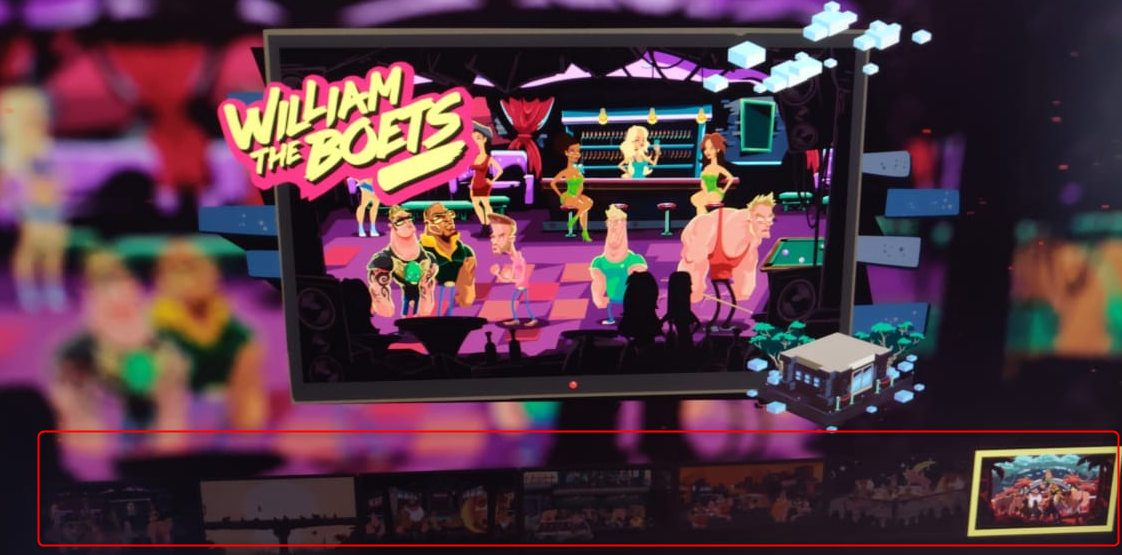
Open up the game and check that I have access to all level, flippin A boet! Keeping the image small below as to not spoil it for the okes that don't want to know what's coming up in the later stages.
Download Save Game
The save game is generic (at the time of writing) so anyone could just copy the save game file to C:\Users\YOUR_USER_NAME\AppData\LocalLow\Califourways\Boet Fighter to unlock the levels, if that's your vibe, just download a copy here (no warranties, always make a backup) and overwrite your one to unlock all the levels: Savegame.bin
Invincible Eddy
So having all the levels is cool enough, but the game is still too hard for me to get very far and I reaaaalllly like the cut scenes (they're awesome) so I reaaalllly want to get past these stages even if it means making it a zero challenge game. The answer, patching the game to make Eddy never get hurt, ever.
Finding The Health Meter
The most obvious way Eddy gets killed is his health meter running out (duh) so the most obvious way to patch the game would be to just stop that from happening. Back to the decompiler, there are a number of decompilers you can use for Unity games, for this I just used trusty old Reflector.
In actual fact, I debugged the game first to test some theories of resetting health among other things, and found the easiest spot in the HeatlhManager class's Update (game loop) method. I won't get into the boring research stuff, but this was the result of my findings:
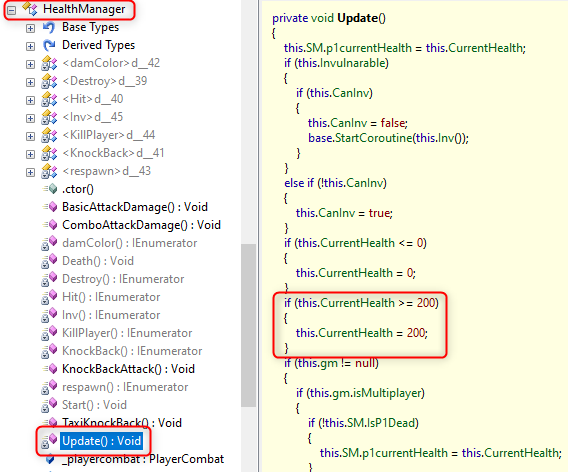
I imagine this logic here is for when picking up health tubs and shakes to avoid your health going over the max, so if we simply switch it from >= to <= then any time you health drops below 200, it will get reset to 200. This is the smallest possible change for someone lazy like me.
Patching The Game
For something like this I'll turn to Reflexil, since there isn't much to tweak here you can avoid full IL dumping of the entire thing and trying to recompile again safely, so it's a useful shortcut to use.
The OpCode we want to change here is from blt.s to bgt.s (less than to greater than). I know it sounds backwards, but in IL land, constants usually get stacked first so this would technically be 200 <= this.CurrentHealth and we're changing it to 200 >= this.CurrentHealth.
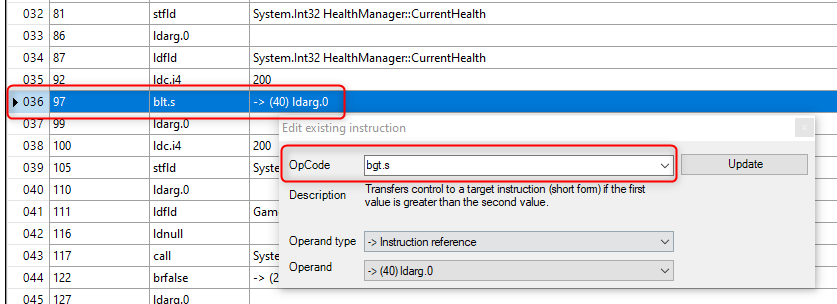
Save this patched assembly and replace the original. We can verify that the patching worked by decompiling the new assembly and going back to check the expression is what we expect:
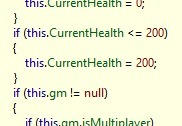
So now if your current health drops below 200, it goes right back up to 200, Invincible Eddy, the way he would be in real laaf!

Not going to share the patched DLL here obviously, you gotta buy the game if you want that. This was just for me to have a jol and moer the game properly in it's face and watch all the videos. if it's too hard to patch things yourself well then it's like the game, flippin hard boet, and you're going to have to play it the hard way! The next update (very quick at this rate cause they listen to feedback a lot) will lose this change but that's cool, I'll keep coming back to check out what's changed and give it another go because I also like the technical aspect.
Go Buy Boet Figher
Go grab a copy of Boet Fighter now on Steam, it's only 200 South African Rond which is basically for nothing given the hours of entertainment you get from it. It's a great, simple game and lots of fun, but if you get too annoyed and getting dribbed constantly (or maybe you just kak at playing like me) at least you can cheat a bit to get all the entertainment value this game has to offer without any of the frustration.
All images etc are copyright of the owners and all that kak.
Don't get me wrong, I really enjoy playing this game, but I enjoy moering okes more without getting moered back. This game is very entertaining and very much worth the money for the solid work the developers put into it and there crazy fast turnaround with bug fixes and features. Hard Eddy isn't the hardest charna in town if he keeps getting bliksemmed so easily, I wanted a Harder Eddy, the Hardest Eddy of them all, Invincible Eddy!
This is cheating, but nothing that the likes of GameGenie never did for us in the 80's, so if you don't like it then get outta here before you get offended.
Unlocking All Levels
Even with the new checkpoints, it's still crazy hard to get past levels and bosses. I was getting bored stuck on the second level fighting the zombies, I wanted to just explore some of the other levels at least and appreciate the artwork without having to spend many hours grinding my way through. So first off, I wanted to unlock all the levels.Looking For Save Games
A quick file/folder search for "Boet Fighter" and I discovered the save game file in your user's \AppData\LocalLow\Califourways\Boet Fighter directory. Simply opening up in Notepad reveals that it's just serialized .NET classes, the important bit looking like this:
Assembly-CSharp, Version=0.0.0.0, Culture=neutral, PublicKeyToken=null...DataState...Level1...Level2
Assembly-CSharp.dll is a typical file name for Unity games, all the game code is bundled in there and the class being serialized here is DataState.
So spin up a quick console app, add a reference to Assembly-CSharp.dll (found in \steamapps\common\Boet Fighter\Boet Fighter_Data\Managed) and see if we can read and write save game files to add all the levels.
To avoid wasting time I could be using playing the game, I decompiled the game assembly and traced back where this class was being used, and how the file was getting read/written when you pass levels. In short, this was the code I wrote based on my existing saved game (with only two levels that I passed) to add in the other levels very much like the game itself would do it, using the games own code from it's assembly.
Custom Save Game Code
var allAccess = new DataState();
allAccess.AddItem(new SaveData("Level1", "\u001b"));
allAccess.AddItem(new SaveData("Level2", "\u001b"));
allAccess.AddItem(new SaveData("Level3", "\u001b"));
allAccess.AddItem(new SaveData("Level4", "\u001b"));
allAccess.AddItem(new SaveData("Level5", "\u001b"));
allAccess.AddItem(new SaveData("Level6", "\u001b"));
allAccess.AddItem(new SaveData("Level7", "\u001b"));
SerializatorBinary.SaveBinary(allAccess,
   Path.Combine(Environment.GetFolderPath(Environment.SpecialFolder.UserProfile),
                @"AppData\LocalLow\Califourways\Boet Fighter\Savegame.bin"));
Open up the game and check that I have access to all level, flippin A boet! Keeping the image small below as to not spoil it for the okes that don't want to know what's coming up in the later stages.
Download Save Game
The save game is generic (at the time of writing) so anyone could just copy the save game file to C:\Users\YOUR_USER_NAME\AppData\LocalLow\Califourways\Boet Fighter to unlock the levels, if that's your vibe, just download a copy here (no warranties, always make a backup) and overwrite your one to unlock all the levels: Savegame.bin
Invincible Eddy
So having all the levels is cool enough, but the game is still too hard for me to get very far and I reaaaalllly like the cut scenes (they're awesome) so I reaaalllly want to get past these stages even if it means making it a zero challenge game. The answer, patching the game to make Eddy never get hurt, ever.
Finding The Health Meter
The most obvious way Eddy gets killed is his health meter running out (duh) so the most obvious way to patch the game would be to just stop that from happening. Back to the decompiler, there are a number of decompilers you can use for Unity games, for this I just used trusty old Reflector.
In actual fact, I debugged the game first to test some theories of resetting health among other things, and found the easiest spot in the HeatlhManager class's Update (game loop) method. I won't get into the boring research stuff, but this was the result of my findings:
I imagine this logic here is for when picking up health tubs and shakes to avoid your health going over the max, so if we simply switch it from >= to <= then any time you health drops below 200, it will get reset to 200. This is the smallest possible change for someone lazy like me.
Patching The Game
For something like this I'll turn to Reflexil, since there isn't much to tweak here you can avoid full IL dumping of the entire thing and trying to recompile again safely, so it's a useful shortcut to use.
The OpCode we want to change here is from blt.s to bgt.s (less than to greater than). I know it sounds backwards, but in IL land, constants usually get stacked first so this would technically be 200 <= this.CurrentHealth and we're changing it to 200 >= this.CurrentHealth.
Save this patched assembly and replace the original. We can verify that the patching worked by decompiling the new assembly and going back to check the expression is what we expect:
So now if your current health drops below 200, it goes right back up to 200, Invincible Eddy, the way he would be in real laaf!
Not going to share the patched DLL here obviously, you gotta buy the game if you want that. This was just for me to have a jol and moer the game properly in it's face and watch all the videos. if it's too hard to patch things yourself well then it's like the game, flippin hard boet, and you're going to have to play it the hard way! The next update (very quick at this rate cause they listen to feedback a lot) will lose this change but that's cool, I'll keep coming back to check out what's changed and give it another go because I also like the technical aspect.
Go Buy Boet Figher
Go grab a copy of Boet Fighter now on Steam, it's only 200 South African Rond which is basically for nothing given the hours of entertainment you get from it. It's a great, simple game and lots of fun, but if you get too annoyed and getting dribbed constantly (or maybe you just kak at playing like me) at least you can cheat a bit to get all the entertainment value this game has to offer without any of the frustration.
All images etc are copyright of the owners and all that kak.